Why Bother with a System? Your Real Estate Superpower
Real Estate Superpower
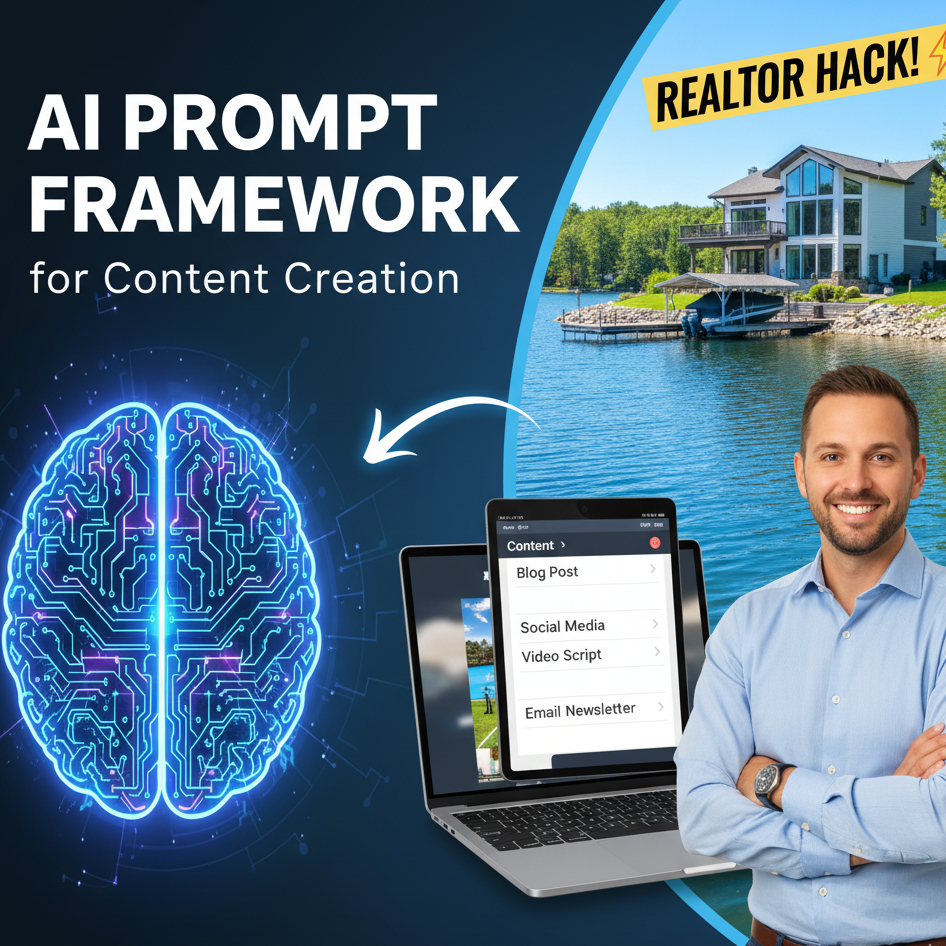
Real Estate Superpower AI
How to Stop Working Late and Start Using Your New AI "Intern"
How many of you spent more than 30 minutes writing a single listing description or a social media post this week? Writing can be exhausting, especially when you’d rather be out showing houses or closing deals.
What if you had a brilliant intern who worked 24 hours a day, knew every marketing trick in the book, and cost you $0? That’s exactly what Gemini (Google’s AI) is. It’s not just a search engine; it’s a "Content Factory" that can take one simple idea and turn it into a week’s worth of marketing.
The "P.R.O.P." Method: How to Talk to AI
You already know how to manage a Property, so just remember the word P.R.O.P. to manage your AI. You don't need to learn "computer code"—you just talk to it like a human.
P – Persona: Give it a job. (e.g., "You are a luxury real estate marketing expert.")
R – Relevance: Give it the details. ("I’m selling a 3-bed home in Green Valley with a big pool.")
O – Objective: Tell it what you need. ("Write me a blog post and 3 Facebook captions.")
P – Polish: Tell it the "vibe." ("Make it sound warm, inviting, and professional.")
One "Seed" Idea, 10 Pieces of Content
The secret to saving time is the Multiplier. You give Gemini one "seed" (like a property address), and it can instantly grow:
A professional listing description.
An email to send to your database.
A script for a 60-second video tour.
Five catchy Instagram captions.
3 Quick Ways to Win Today
You don’t have to be a tech genius to start. Here are three things you can do in under five minutes:
The Neighborhood Guide: Ask Gemini: "List 10 things only locals know about [Your Neighborhood]." Boom—you have an instant blog post that proves you’re the local expert.
The Objection Handler: Worried about a tough meeting? Tell Gemini: "My client thinks the market is crashing. Give me 3 kind but data-driven things to say to help them feel calm."
The Photo Helper: Gemini is "multimodal." This is a fancy way of saying you can upload a photo of a messy kitchen and ask, "Write a poetic description of what this kitchen would look like after a modern renovation."
A Note for the Pros
Talk like a person: If Gemini writes something too long, just say, "Make it shorter," or "Make it funnier." It listens!
Fact Check: AI is smart, but it’s not perfect. Always double-check the addresses and prices before you hit "post."
The Challenge: Before you finish your coffee today, take one of your current listings and ask Gemini to "Write 5 Instagram captions for this." You’ll be amazed at how much time you get back in your day.
Hey there, amazing real estate agents! Ever feel like there aren't enough hours in the day? You're not alone. Between showing houses, talking to clients, and trying to get your name out there, it can feel like you're spinning a hundred plates at once. What if I told you there's a simple way to get more done, save a ton of time, and sell more houses?
It all comes down to one simple idea: creating a system. Think of it like a recipe. You wouldn't try to bake a cake without a recipe, right? You need to know what ingredients to use and in what order. A marketing system is the same thing. It provides a clear plan, so you're not just guessing.
Currently, you may be creating things one at a time. You write a property description for a new listing, then you have to start all over again to write a Facebook post, an Instagram post, and so on. It's a lot of work, and it takes a long time. But with a system, you can do it all at once! This blog will teach you how to set up your own system using a simple tool you already have access to: artificial intelligence (AI).
The BIG Problem: Not Enough Time!
Let's be honest. The biggest problem for most real estate agents isn't a lack of ideas—it's a lack of time. You know you need to be active on social media, you need a great blog, and you need to send regular emails. But where do you find the time to create all that stuff? It's a huge mountain to climb, and it can feel overwhelming. This is precisely why you need a system. A system takes that big, overwhelming mountain and turns it into a small, easy-to-climb hill.
The Solution: Building a Content Machine
So, how do you build this system? It's actually a lot easier than you think. The secret is to create one great piece of content and then "repurpose" it. Repurposing means taking something you've created and using it in multiple ways. Think of it like taking one delicious meal and having leftovers for a few days. It's a huge time-saver!
This is where a "prop" comes in. No, not a movie prop! In this case, a "prop" refers to a prompt that you provide to an AI. A prompt is just a set of instructions. By providing the AI with a highly detailed prompt, you can instruct it to generate all the necessary content pieces simultaneously.
Think about it. Instead of writing a property description, then a Facebook post, then a LinkedIn article, you can write one amazing prompt that tells the AI to create all of those things for you. It's like having a magical assistant who does all the busywork for you. This one-time effort saves you hours and hours of work down the line.
Here’s the Step-by-Step Process: Your Content Recipe
Ready to get started? Follow these steps to build your own content-creating superpower.
Step 1: Get Your "Prop" Together
The first and most important step is creating your detailed prompt. This is what you'll feed into the AI to get all your content. Don't rush this part! The more specific you are, the better the results will be. Think of this as the "blueprint" for all your marketing materials.
Here's the secret sauce, the "AI Prompt Foundations Framework." This is your recipe for success. You need to include these six ingredients in your prompt:
Task: What do you want the AI to do? Be super clear. For example, "Create multiple pieces of content for a real estate listing."
Context: Provide the AI with all the necessary background information. What's the property address? How much does it cost? What are the special features? The more details you give, the better the AI will understand what you need. For our example lake house, you'd tell the AI it's a new lake house on Tim’s Ford Lake, custom-built in 2025, with a boat dock and a huge lot.
Exemplar: Give the AI an example of what you want the final product to look like. Tell it exactly what kind of content you want it to create, like "a blog post, a Google Business Profile Post, a LinkedIn Article, an Instagram Post, etc."
Persona: Who should the AI pretend to be? You can tell it to write in a specific voice. For our example, we'll ask it to write like a professional, award-winning freelance writer.
Format: How do you want the final content to be organized? Do you want a list? Do you like it separated by headings? Specify exactly how you want the finished product to appear to the AI.
Voice: What's the tone of your content? Do you want it to be a fun and casual experience? Or serious and professional? For our example, we want an "active voice" and a simple, easy-to-understand style.
By combining all these pieces into a single prompt, you're instructing the AI precisely what you want it to do, and you're providing it with all the necessary information to perform a great job.
Step 2: Let the AI Do the Heavy Lifting
Once you have your detailed prompt ready, you copy and paste it into a tool like ChatGPT. Press enter, and watch the magic happen! The AI will work its wonders and create all the different content pieces you asked for, all at once.
Step 3: Review and Personalize
The AI is a fantastic tool, but it's not perfect. You must read through everything it creates. You can make small adjustments to ensure it sounds exactly like you. Perhaps you'd like to include a personal story or a notable detail about the neighborhood. Taking a few minutes to review and edit will make the content even better.
The Amazing Benefits: Why This Matters to YOU!
Now that you know how to do it, let's talk about why this is so important for your business.
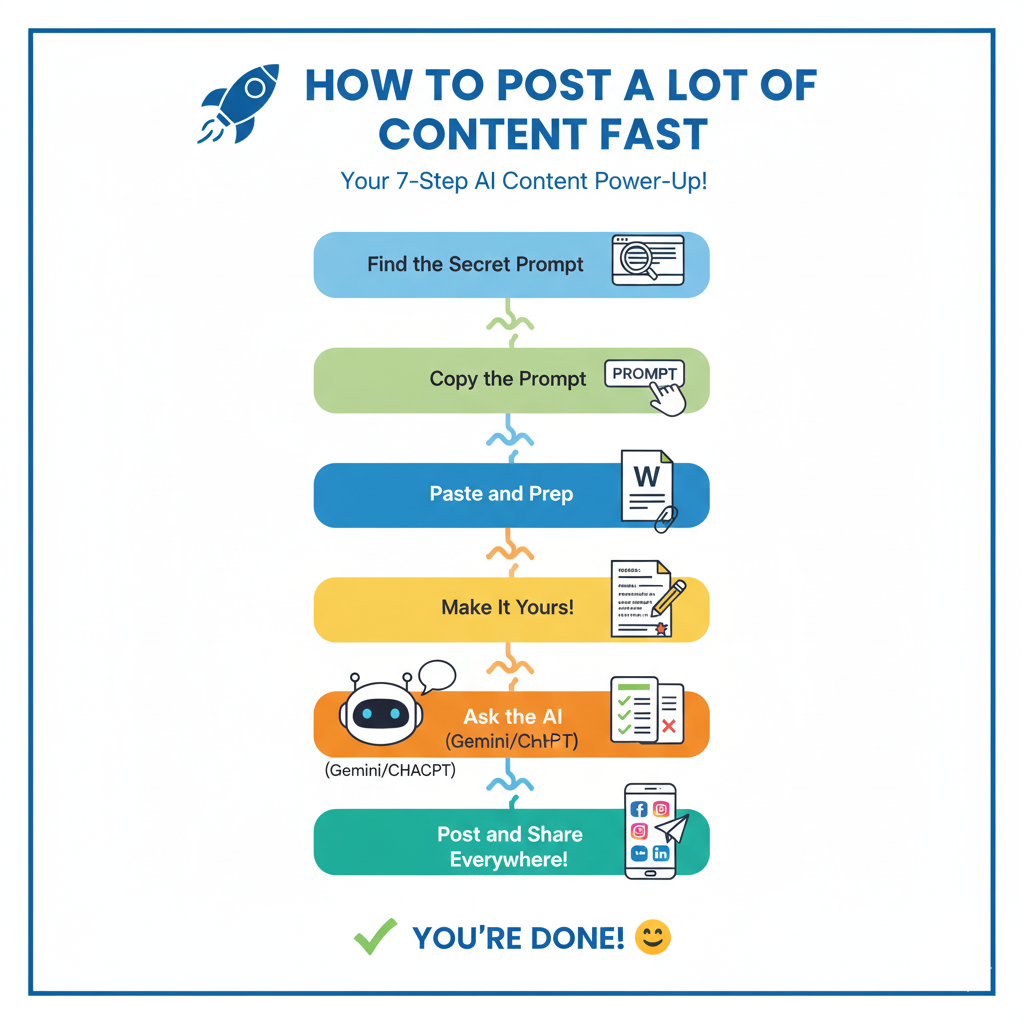
The 7-Step Content Power-Up
National Association of REALTORS® (NAR) 2024 Technology Survey:
70% of agents consider social media to be either very impactful or somewhat impactful in their business.
52% think social media is one of the top tech tools that have provided the highest number of quality leads.
87% percent of agents use Facebook in their real estate business, 62% use Instagram, 48% use LinkedIn, and 25% use YouTube.
🤖 Fast Content with AI: Your Real Estate Superpower
👋 Agents!
You don't need to be a computer genius to make tons of great social media content fast! You just need a simple prompt and an AI tool like Gemini or ChatGPT.
This guide shows you the exact tools you need and the 7 easy steps to make content in minutes!
💡 Your AI Content Toolbox
These are the simple things you need to have ready before you start:
Tools…
What It Does - An AI Platform. This is the "brain" that writes for you. Example: Google Gemini, ChatGPT, or Claude.
Where do you fix and save your drafts. Example: Google Docs or Microsoft Word.
The Social Media Marketing Kit from Real Estate Photographer Pro. (Save this folder on your desktop!)
Your Megaphone - All the places you’ll share your finished content: Facebook, Instagram, Blog, Newsletter, LinkedIn, etc.
🚀 The 7-Step Content Power-Up
Follow these steps exactly. This is how you take a great prompt and turn it into content for a whole week!
STEP 1: Find the Secret Prompt
The prompt is the special recipe!
Go to realestatephotographerpro.com
Scroll to the bottom and click the Blog link.
Search for the post: AI Real Estate Agent Superpower.
STEP 2: Copy the Recipe
Open that blog post and copy the entire AI prompt. This is the text you will feed to the AI. https://www.realestatephotographerpro.com/blog/al-real-estate-superpower
STEP 3: Paste and Prep
Paste the prompt into your Word or Google Doc. This is where you will make your changes.
STEP 4: Make It Yours!
This is the most crucial step! Read the prompt you pasted and change the parts that describe the property you are listing.
STEP 5: Ask the AI (Your Partner!)
Copy your finished, personalized prompt from your Word Doc.
Paste it into your favorite AI tool (like Gemini or ChatGPT). Hit Send!
Wait a few seconds... the AI will write a ton of different content options for you!
STEP 6: Check and Polish
Copy the AI's response back into your Word/Google Doc.
Read everything carefully. The AI is intelligent, but it's not perfect!
Fix any little mistakes.
Add your own personal, human touch or voice.
STEP 7: Post and Share Everywhere!
Now you have fantastic, ready-to-go content!
Use the ideas in the Marketing Kit to see which posts are best for Facebook, which ones are best for Instagram, and so on.
Copy and paste your polished content to all your social media platforms! You're done!
Marketing Kit Overview
Benefit 1: Time Saved!
This is the big one. Instead of spending hours and hours creating content, you're getting it all done in minutes. This frees up your time to do what you do best: talking to clients, showing houses, and building relationships. Imagine having all your social media posts for a new listing created in less than an hour! That’s time you can use to follow up with leads or network with other agents.
Benefit 2: More Marketing Exposure!
The more content you put out there, the more people see you. It's like having your own personal billboard all over the internet. When you have a system in place, it's easy to create a blog post, a LinkedIn article, and five different social media posts. This means you're not just posting on one platform; you're everywhere! The more places you are, the more people will see your name and your listings. It’s like casting a wider net to catch more fish.
Benefit 3: Get More Customers!
This all leads to the final, most important benefit. The more marketing exposure you have, the more people will see you as a knowledgeable and reliable real estate agent. When people are ready to buy or sell a house, they will remember your name because they've seen your content everywhere. This means more leads, more clients, and more houses sold.
Think about it: A potential customer is scrolling through Instagram and sees your beautiful post about a new listing. They then go to Google and find your great blog post about the same house. They see your LinkedIn article and think, "Wow, this agent really knows their stuff!" When they're ready to buy, who do you think they'll call? You!
Creative Story: The Lake House That Found Its Family
Imagine a family named the Johnsons. They lived in the city, but they dreamed of a peaceful place to escape to on weekends. They spent every night scrolling through Zillow and Realtracs, but nothing felt right. One day, Mrs. Johnson saw a beautiful picture of a lake house on Instagram. She clicked your profile and saw a YouTube Shorts video of the house. She then visited your blog and read a detailed story about the home, learning about the community and all the fun activities they could enjoy there. The content you created didn't just show them a house; it helped them imagine their future there. They felt like they already knew the house before they even saw it. They called you, and within a few weeks, that lake house was theirs. This story isn't just a fantasy; it's what happens when you use a great marketing system.
Frequently Asked Questions
Q: Will this make me sound like a robot?
A: No! The AI creates the first draft, but you add the personal touch. You are the expert; the AI is your helpful assistant.
Q: Is this hard to do?
A: Not at all! The most challenging part is creating the initial detailed prompt. Once you have that "prop," you can use it over and over again for different properties.
Q: Will this actually save me time?
A: Yes! Imagine spending 30 minutes to create a prop and get a full week's worth of content versus spending 3-4 hours creating it all one piece at a time. It's a huge time-saver.
Call to Action
Ready to save time, get more exposure, and sell more houses? It's time to build your own system! If you want to see a real-life example of this in action, check out the amazing content we created for a stunning lake house. And if you need help with professional photos and videos for your next listing, be sure to contact Real Estate Photographer Pro, LLC. They can help you get the beautiful images you need to make your prop even better.
Checklist for Brand Visibility in ChatGPT, Gemini & More
This video is about a new way to get your real estate business found online called AEO (Answer Engine Optimization).
Think of it this way: In the old days, people typed "Best Realtor in [Your City]" into Google and looked at a list of websites. Today, they ask ChatGPT or Gemini, "Who is the best person to help me sell my house in [Your City]?"
If you want the AI to "recommend" you, your blog needs to be written in a specific way. Here is the simple, step-by-step process for real estate agents.
Step 1: Put the Answer First
AI tools are impatient. They want the answer immediately so they can tell the user.
The Old Way: Writing a long story about the history of the neighborhood before finally giving a price tip.
The New Way: Start your blog post with a clear, one-sentence answer to a common question.
Example: "The best time to sell a home in Nashville is mid-April because that is when buyer demand is highest."
Step 2: Use "Question" Headings
Instead of using creative titles like "Spring Market Magic," use the exact questions your clients ask you on the phone. This helps the AI connect your blog to a person’s question.
Step: Change your blog titles to things like:
"How much are closing costs for buyers?"
"Should I fix my kitchen before selling?"
Step 3: Use Lists and Tables
AI "bots" love organized data. It’s easier for them to read a table than a long paragraph.
Step: If you are comparing two neighborhoods or listing the steps to get a mortgage, use bullet points or a simple table.
Step 4: The "Taco Bell" Test (Keep it Simple)
The video mentions the "Taco Bell Test." This means every section of your blog should make sense all by itself.
Step: Imagine someone only reads one paragraph of your blog. Does it still give them value? If the paragraph says, "As I mentioned above..." the AI might get confused. Each section should stand on its own.
Step 5: Mention Your Business Often
If you write a great article about "How to Buy a Home" but never mention your name or your agency, the AI will learn the info but won't know to credit you.
Step: Every few paragraphs, tie the advice back to your service.
Example: "At [Your Name] Realty, we use this specific strategy to help our clients save 5% on their first home."
Step 6: Use "Schema" (The Technical Secret)
Don't let the word "Schema" scare you. It’s just a digital label that tells the computer, "This is a recipe," or "This is a real estate agent's address."
Step: If you use a website tool like HubSpot or a plugin like Yoast, look for the FAQ Schema or Local Business Schema setting. It’s usually just a checkbox or a form you fill out once.
Summary Checklist for Your Next Blog:
Ask a Question: Use it as your headline.
Answer Immediately: Give the "short version" in the first paragraph.
Use Bullets: Break down your process into 1, 2, 3.
Stay Local: Mention your specific city and your business name several times.
Be the Expert: Give a real-world tip that only a local agent would know.
Agent Content Creation Prompt
Need
We need to create a large amount of content.
Problem
Do not have the time.
Solutions
Create a system.
Benefits
Marketing exposure
Time saved
More leads
Content Creation Platforms
Write a property description for Realtracs and Zillow.
Blog Post
Write Google Business Profile Post:
Write LinkedIn Article:
Write Facebook Post:
Instagram Post:
Write a YouTube video script long:
Write a YouTube short video script:
Write a newsletter email summary of the blog post:
Social Media Quote Cards:
Write Three Social Media Ads:
AI Prompt Foundations - Framework
Task: This one is straightforward. Tell the AI what you need. It could be writing an intro, drafting a blog post, or generating ideas.
Context: Give as much background and detail as possible at this stage. The more specific you are, the better. Let the AI know details that are important to the task (like what your take is on a subject you’re writing about).
Exemplar: Just a fancy way of saying “example.” Explain to ChatGPT exactly what kind of output you’re looking for. Including real examples will help it get closer to what you envision.
Persona: Who should the AI “be” while writing this content for you? Imagine that AI can wear different hats for different tasks. Explain who it is within your prompts, and it’ll have a much better understanding of how to go about creating your output.
Format: Please specify the desired format for the final product. What exactly should the AI output look like? Do you want a list, a paragraph, a blog post with multiple sections, some bullet points? Be specific here.
Voice: Always define the style and tone when you’re writing a ChatGPT prompt. Do you want your output to be casual, formal, playful, or something much more nuanced? Let these tools know, so your writing outputs will match your vibe.
Prompt Guidelines on the Topic

Prompt Guidelines on the Topic
+++copy prompt+++
Write content using the following guidelines on the topic…..
Task:
Create multiple pieces of content using the information listed below.
Context:
We are creating content for real estate agents to help them effectively market a lake house. This lake house is valued at $700,000.
Exemplar:
Ensure each category is clearly separated, with distinct outputs for the following: blog post, Google Business Profile Post, LinkedIn Article, Instagram Post, YouTube video script, YouTube short video script, newsletter email summary of the blog post, Social Media, Quote Cards, Social Media Ads.
Persona: (Change this command prompt to fit your particular situation)
The customer we are targeting who could purchase this type of house would need to be able to secure a mortgage for $700,000 and would likely be a second home for a mature, wealthy family. Living in the Nashville area or the Huntsville, Alabama area.
Format:
Text is separated by each category. With a Header for the category.
Voice:
Write in the voice of Lindy Alexander, Award-winning freelance writer https://thefreelancersyear.com/ - Write in an active voice. Write at an eighth-grade reading level. Write a blog to avoid typical AI writing patterns by using:
Define the topic: (Change this command prompt to fit your particular situation)
We are creating content that would help sell and promote a lake house. Property address 885 Majors Cemetery Rd, Lynchburg, TN 37352
Background information: (Change this command prompt to fit your particular situation)
885 Majors Cemetery Rd, Lynchburg, TN, Lake house on Tims Ford Lake, in the Lynchburg, Tennessee area.
Incorporate keywords: (Change this command prompt to fit your particular situation)
New lake house, built in 2025, custom-built, on the lake with a boat dock, .83 Acres Lot.
Contact information for this project: (Change this command prompt to fit your particular situation)
Real Estate Photographer Pro, LLC, Kenneth Purdom - Founder, 615-310-7171 - kenneth@realestatephotographerpro.com - Book Online 24/7 - https://www.realestatephotographerpro.com
Output Needed
The output should be organized into the following categories, including the following items.
Write a property description for
Realtracs
Zillow
Write Blog Post:
800 words to 1500 words.
Ensure the blog has a compelling attention-getting title.
In the middle, have a creative story that complements the topic in the blog with frequently asked questions and answers.
Include information about the property and surrounding communities.
Call to Action
An EXCERPT for the blog (50 characters max),
An SEO TITLE (90 characters max)
5 relevant SEO tags with the hashtag sign separated by commas
A concise SEO DESCRIPTION (100 characters)
An expanded SEO DESCRIPTION (350 characters).
Write Google Business Profile Post:
Google Business posts have a character limit of 1,500 characters, including spaces. Use Lists, Bullet Points, and Short Paragraphs: If you need to convey more information, break up the text with lists, bullet points, and short paragraphs to make it easier to read and digest. List five hashtags separated by commas.
Write LinkedIn Article:
Optimal Length for Impressions: For maximum visibility, posts between 1,900 and 2,000 characters (approximately 300-400 words) are recommended. List five hashtags separated by commas.
Write FIVE Facebook posts:
Facebook, aim for posts between 40-80 characters (approximately 5-10 words). List five hashtags separated by commas.
Write FIVE Instagram posts:
Aim for posts between 40-80 characters (approximately 5-10 words). List five hashtags separated by commas.
Write a YouTube video script:
Create a detailed video (5 minutes) explaining the blog post’s content, such as a tutorial, discussion, or storytelling format, with a link to the blog in the description.
Write a YouTube short video script:
Condense the blog post’s central idea into a quick, engaging 60-second or less video for YouTube Shorts, designed to capture attention with visuals or text overlays. The script will be used by the real estate agent to create a video on camera, talking about the property.
Write a newsletter email summary of the blog post:
Include a summary or excerpt of the blog post in your email newsletter, with a call-to-action linking to the full post on your website. 500 characters.
Social Media Quote Cards:
Create visually appealing quote cards featuring key lines from the blog post - List five hashtags separated by commas
Write Three Social Media Ads:
Use key points or visuals from the blog post - List five hashtags separated by commas.
+++END OF PROMT+++
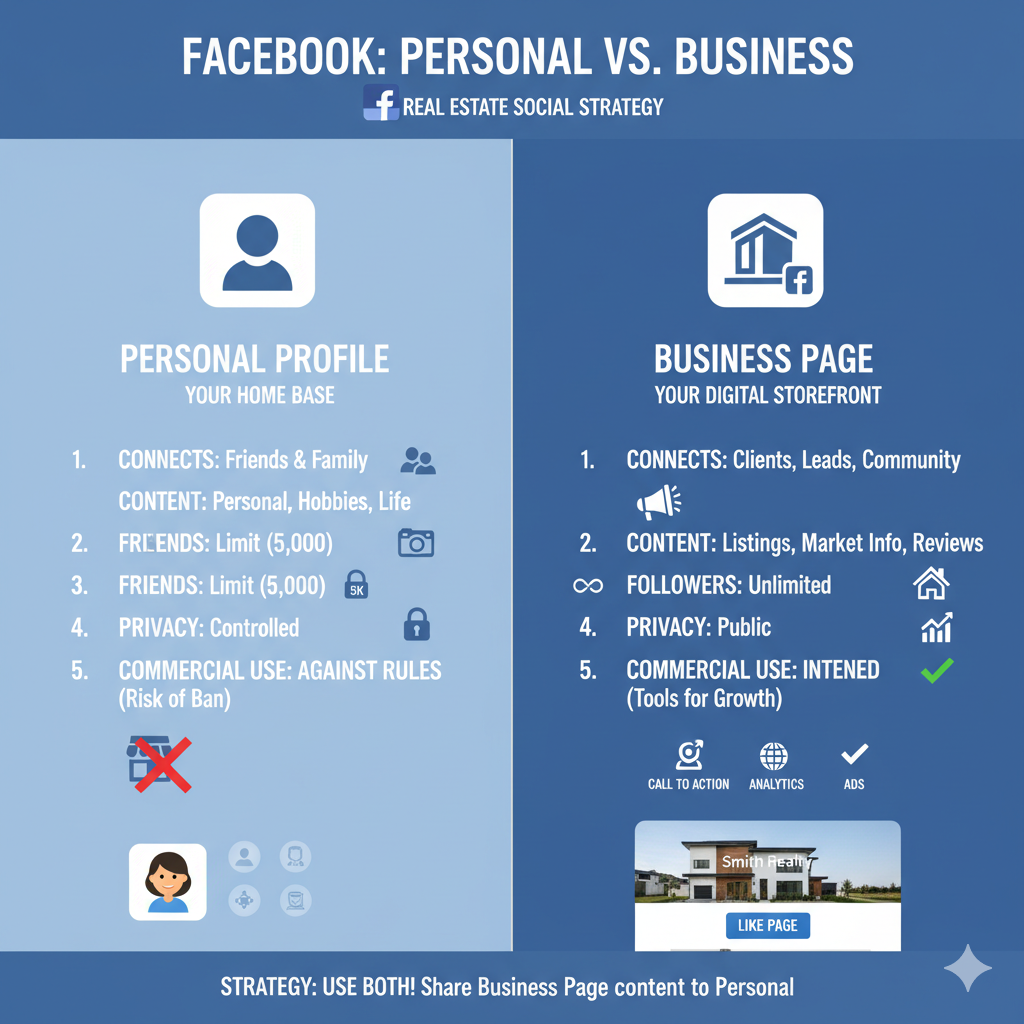
Facebook Personal Page vs Facebook Business Page
Facebook: Personal Profile vs. Business Page
The Personal Profile: Your Home Base
A personal profile is for connecting with friends, family, and acquaintances. It's where you share your personal life, hobbies, and interests. Think of it as a way for people to get to know you as a person.
Key Characteristics:
Limited Friends: Capped at 5,000 friends.
Privacy Control: You can set posts to be visible only to friends.
Against Terms of Service: Using a personal profile for commercial activity, such as posting listings and promoting your business, is against Facebook's rules and can get your account shut down.
The Business Page: Your Digital Storefront
A business page is your professional hub on Facebook, designed specifically for showcasing your real estate business. It is a vital tool for lead generation, brand building, and establishing authority in your market.
Key Characteristics:
Public and Searchable: Business pages and their content are publicly accessible and can be easily found on search engines like Google and Bing.
Unlimited "Likes": No limit to the number of followers you can have.
Analytics and Insights: Provides valuable data on your audience, post performance, and engagement.
Advertising Tools: Essential for running targeted ad campaigns and "boosting" posts to reach a wider audience beyond your immediate followers.
Professional Features: Includes "Call to Action" buttons, allows for client reviews, and enables multiple admins, which is perfect for real estate teams.
The Strategy: Have both! Use your personal profile to share a mix of personal and professional content, staying top of mind with your network. Utilize your business page as the primary source for all your professional content, including listings, market updates, and client testimonials. You can always share content from your business page to your personal profile to increase visibility for your listings and services.
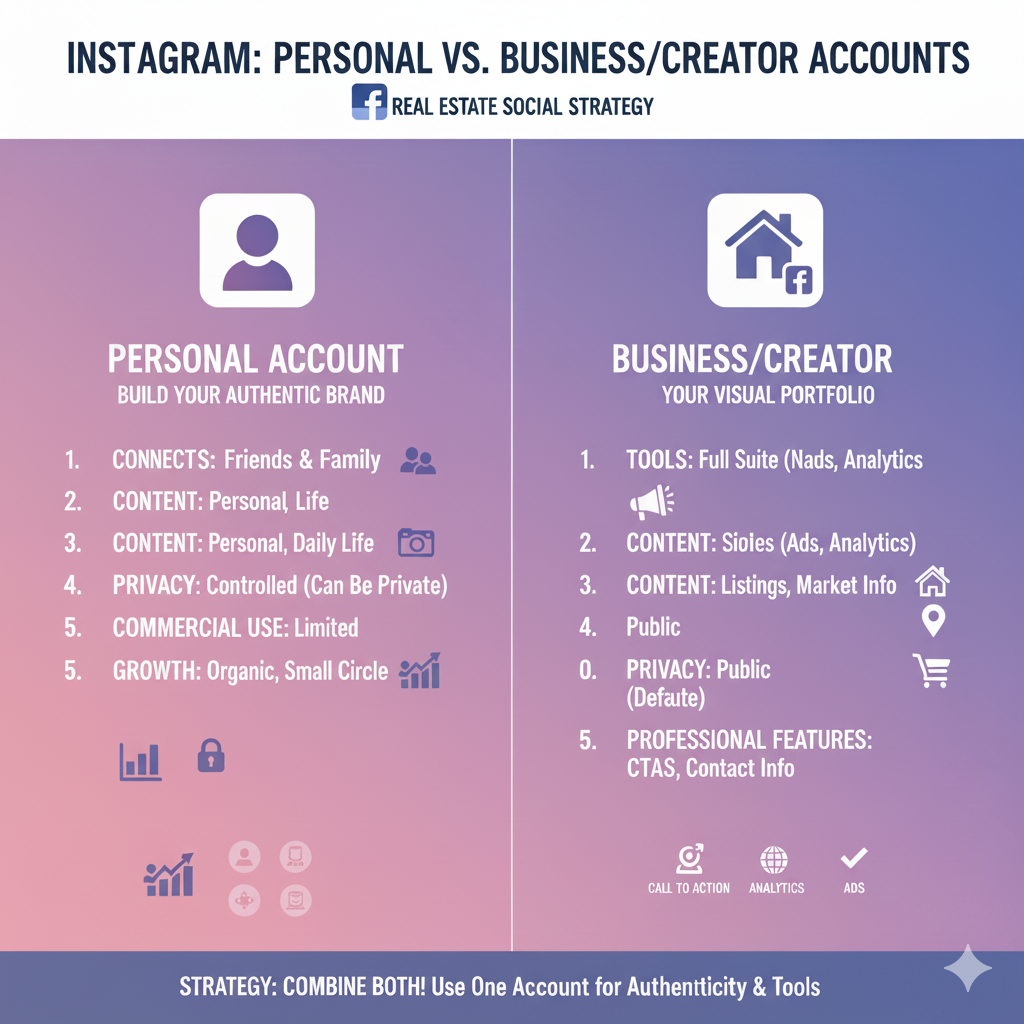
Instagram: Personal vs. Business/Creator Accounts
Instagram: Personal vs. Business/Creator Accounts
The Personal Account: Building Your Authentic Brand
A personal Instagram account is where you connect with your close circle and share your daily life. While it can be useful for building a relatable brand, it lacks the tools needed for professional marketing.
Key Characteristics:
Limited Tools: Does not have access to analytics, post scheduling, or ad features.
Privacy Options: Can be set to private, allowing you to approve who follows you.
The Business/Creator Account: Your Visual Portfolio
For real estate agents, converting your account to a business or creator account is crucial. These accounts provide the professional tools needed to grow your business and reach a targeted audience.
Key Characteristics:
Analytics and Insights: Provides detailed data on your followers and content performance.
Ad Features: Allows you to promote posts and run targeted ad campaigns.
Contact Information: Lets you display a business address, email, and phone number directly on your profile.
Professional Features: Includes "Call to Action" buttons and access to a multi-tab inbox for managing messages from clients.
The Strategy: For many real estate agents, combining personal and business content on a single business or creator account is the most effective approach. This allows you to leverage your existing network while showcasing your personality and expertise. A balanced mix of personal and professional posts builds trust and authenticity, which is essential in real estate. When you have two separate accounts, ensure that you post distinct content on each to avoid annoying your followers. Use the business account for polished, professional content and the personal account for more private moments. Remember, consistency and high-quality visuals are key to success on this platform.

FREE TOOLS
List of free AI systems
Using AI can feel overwhelming, but there are free tools that can help you with your real estate business. Here's a list of some of the most popular free AI systems and how they can benefit you.
0. Grammarly - https://www.grammarly.com
Grammarly makes AI writing convenient. Work smarter with personalized AI guidance and text generation on any app or website.
1. ChatGPT - https://chatgpt.com
ChatGPT is a highly popular AI that can handle a wide range of tasks. Its main advantage is its versatility. You can use it to:
Write property descriptions. Provide a few key details, and it can craft a compelling, professional description for you.
Draft emails. Need to follow up with a lead or write a newsletter? ChatGPT can help you write personalized and effective messages.
Brainstorm ideas. If you're stuck on what to post on social media or what to write about for your blog, ChatGPT can offer a range of creative ideas.
The free version of ChatGPT is great for quick, day-to-day tasks. Its ability to create content on a wide range of topics makes it a versatile tool for busy real estate agents.
2. Gemini - https://gemini.google.com
Gemini, formerly known as Bard, is Google's AI assistant. Its main advantage is its integration with Google's ecosystem. If you use Google products like Gmail, Google Docs, or Google Sheets, Gemini can work directly with them, which is a significant time-saver. Gemini is especially good for:
Real-time information. Since it's connected to Google Search, it can pull the most current information, which is great for answering questions about local market trends or neighborhood details.
Data analysis. You can upload a spreadsheet of your leads and ask Gemini to analyze the data, helping you find patterns and insights to improve your business.
Deep research. Gemini excels at summarizing long articles or reports, which is particularly useful when you need to quickly grasp the key points of a new housing report or a local policy change.
3. Claude - https://claude.ai
Claude is an AI system known for its large "context window," which enables it to read and understand a vast amount of text simultaneously—such as a lengthy report or an entire book. This makes it different from other systems that can only handle shorter pieces of text at a time. This is a huge advantage for real estate agents because you can:
Analyze large documents. Have a lengthy document with legal information or a detailed report on a community? You can paste the whole thing into Claude and ask it to summarize the key points for you.
Create detailed guides. Claude is great for creating in-depth, well-researched content, such as a guide for first-time homebuyers or a detailed market analysis for a specific neighborhood.
Maintain accuracy. Because it can process a large amount of information, it can provide a more comprehensive and accurate response.
4. Groc - https://grok.com
Croc is not a large language model like the others. It's an AI browser extension that uses Gemini's technology. Its main advantage is that it works on-device, meaning it's built into your web browser, which makes it fast and easy to use. It's different because it's not a chat you visit; it's always available in your browser. With Croc, you can:
Summarize articles instantly. If you're reading a news article about the housing market, you can use Croc to get a quick summary without leaving the page.
Write or rewrite text on the fly. You can use Croc to help you write an email or a social media post while you are on that website.
Quick actions. You can instruct it to take a screenshot or find something in your browsing history simply by using a command. Its strength lies in its convenience and its ability to assist with small, everyday tasks as you work.

Social Media Platforms
Here's a list of social media platforms and brief descriptions of what makes each one different for a real estate agent, so you can see where to focus your time.
Blogging
Blogging is about showing your expertise and giving valuable information. It's a long-form platform where you can write detailed articles about topics like "The 5 Steps to Buying Your First Home" or "What to Expect at a Home Inspection." Blogs are great for SEO (Search Engine Optimization), which means they help your website show up when someone searches on Google. It's a place to build trust and authority as a local real estate expert.
Facebook Post
A Facebook Post is a mix of personal connection and broad reach. Because many people use Facebook, you can reach a wide range of ages and groups. The best posts are engaging and community-focused. You can share new listings with a few photos, post a fun poll asking people what their dream kitchen looks like, or share a local event to show you're part of the community. It's a platform for building relationships and having conversations.
Instagram Post
Instagram is all about visuals. It's the perfect place to showcase beautiful photography and videos. The best posts are short, visually appealing, and emotionally driven. You can use a carousel to show off the best rooms in a new listing, or a quick video to highlight a stunning view from a property. The goal is to inspire people and get them to fall in love with a home before they even read the description.
Google Business Post
A Google Business Post is different because it's meant for people who are actively searching for you. When a potential client searches for a real estate agent in your area, your Google Business Profile shows up. A post here is direct and informative. You can post about a new listing, a recent sale, or an open house. It's a great way to put your most important, up-to-date information right in front of people who are ready to make a decision.
LinkedIn Post
LinkedIn is a professional network. This is where you connect with other business people, investors, and clients. Your posts here should be educational and showcase your expertise in the industry. Instead of just posting a new listing, you can write about local market trends, share a client's success story, or offer advice on real estate investing. It's about building a professional reputation and showing you're a serious expert.
YouTube Long Videos
YouTube long videos are for giving a comprehensive and detailed tour of a property or an entire neighborhood. This is where you create a comprehensive video walkthrough of a home, highlighting all its special features. You can also create educational videos, such as a comprehensive guide on "The Home Buying Process from Start to Finish." Long videos build a deep connection and trust with your audience because they feel like they're getting a personal tour or lesson from you.
YouTube Shorts Videos
YouTube Shorts are quick, engaging videos, 60 seconds or less. They are designed to grab attention fast. Unlike a long video, a Short focuses on a single, powerful idea. You can show a quick "before and after" of a renovated room, highlight one amazing feature of a house, or share a single fun fact about your neighborhood. They are excellent for expanding your reach and quickly capturing the interest of new people in your content.

Social Media Platforms
social media platforms to reach different groups
As a real estate agent, you need to be active on many social media platforms to reach different groups of people. Manually posting to each one takes a lot of time. That's why social media management tools are so helpful. They allow you to log in once and post to all your social media accounts simultaneously. While many of these tools offer paid plans, a significant number also provide a free option that is ideal for small businesses or individual agents.
Here is a list of tools, such as Hootsuite, and what makes each one special.
1. Buffer - https://buffer.com
Buffer is an excellent option for real estate agents just starting with social media.
How it's different: Buffer is known for its simplicity and ease of use. The "free forever" plan allows you to manage up to three social accounts and schedule a small number of posts per month.
Advantage for you: It features a clean and simple calendar view that allows you to view all your scheduled posts. This makes it easy to plan your content for the week or month ahead and make sure you're posting regularly. It's an excellent tool for getting organized without feeling overwhelmed.
2. Sprout Social - https://www.socialpilot.co
Sprout Social is a more advanced option, but it has a powerful free trial.
How it's different: Sprout Social is a professional tool that focuses on deep analytics and social listening. This means it can help you not only post but also understand how your posts are doing and what people are saying about you online.
Advantage for you: While you may need a paid plan for the full features, their free trial can give you a taste of what's possible. It can show you which of your posts are getting the most attention, so you know what content works best with your audience. This can help you make smarter decisions about what to post in the future.
3. Later - https://later.com
It later started as an Instagram scheduling tool and has evolved into a versatile all-around tool, particularly for visual content.
How it's different: Its main advantage is its visual-first approach. It features a great visual calendar that lets you see exactly how your photos and videos will appear on your Instagram or Facebook grid before posting them.
Advantage for you: This is perfect for real estate agents who rely on beautiful photos of properties. You can plan the look of your entire Instagram feed to make it look clean and professional, which is great for attracting potential buyers.
4. Sendible - https://www.sendible.com
Sendible is a good choice for agents who have a team or work with multiple clients.
How it's different: It's designed to be highly customizable and collaborative. This tool is designed to handle multiple clients or team members, ensuring everyone is on the same page.
Advantage for you: If you work with a team of assistants or a marketing company, Sendible has features that let you set up approval workflows. This means your team can draft a post, and you can approve it before it goes live, ensuring everything you post is just right.
5. Zoho Social - https://www.zoho.com/social
Zoho Social is part of a larger family of business tools, making it very well-suited for seamless integration with other software.
How it's different: Its main advantage is its integration with Zoho's other products, particularly its CRM (Customer Relationship Management) system.
Advantage for you: If you're already using Zoho for your customer contact information, you can connect Zoho Social to it. This can help you identify which of your social media activities are driving new customers. It enables you to track if your marketing is actually working and bringing in new leads.
AI Video Examples
The Realtor's Dilemma
You're great at relationships, but content creation isn't your job.
Most realtors aren't struggling with expertise; they're working with time. Between client calls, open houses, and negotiations, showing up consistently online feels impossible.
The Problem with Traditional Marketing
Posting ad-hoc (irregular, reactive marketing rather than strategic)= invisible.
Scaling content = exhausting.
Algorithms reward consistency. But creating polished, brand-aligned Video content every week isn't realistic for most agents. The result?
Burst visibility, followed by silence, and a brand that looks inconsistent.
Scale your presence, not your stress.
Lavatr.ai creates a digital twin of you, trained on your tone, style, and professionalism that can:
Deliver property intros, market updates, or client follow-ups on demand.
Maintain your voice, rhythm, and warmth, never robotic.
Keep you visible, even when you're offline.
Takeaway: You don't need to become an influencer. You need to stay visible, with integrity.
Results That Matter
From invisibility to influence on your terms.
Stay consistent without feeling performative.
Build credibility through high-quality, human-centered videos.
Generate leads faster with personalized follow-ups powered by your avatar.
Protect your energy; both your reputation and your well-being matter.
Be seen. Be trusted. Be remembered. Create a digital twin today.
Be seen. Be trusted. Be remembered. Create a digital twin today.
Best Social Media Management Tools 2025
Tools for Posting
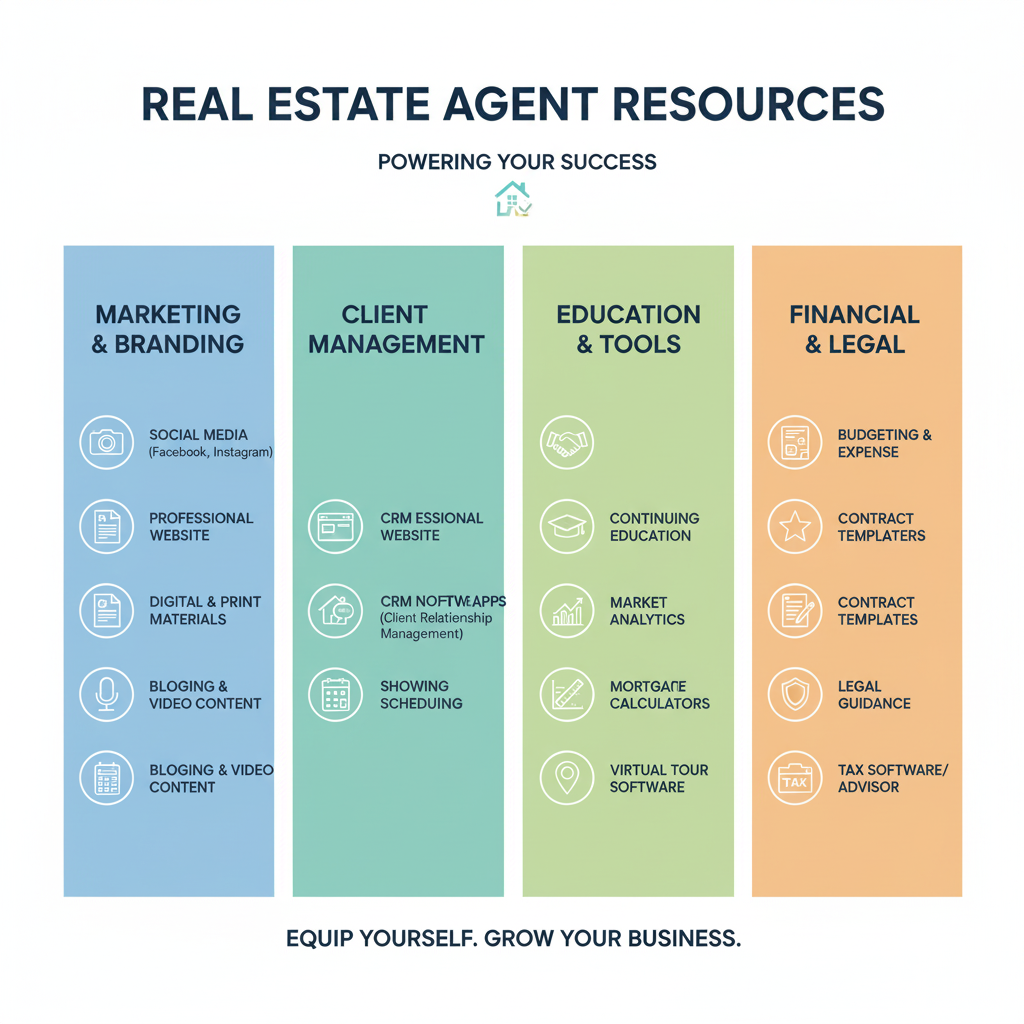
Resources for Real Estate Agents
Using tags like @everyone, @followers, and @topfans on Facebook can be a powerful way for real estate agents to increase visibility and engagement. Here's a breakdown of how these features work and other important posting methods to consider.
Understanding @everyone, @followers, and @topfans
@everyone: This is a tag that can be used in Facebook Groups to notify all members. When a real estate agent posts in a group and includes @everyone, every member of that group will receive a notification, regardless of their individual notification settings for the group. This is a high-impact tool for urgent or important announcements, such as a last-minute open house, a new market report, or a time-sensitive Q&A session.
@followers: This feature is used on a Facebook Business Page to notify all followers about a new post. Similar to @everyone in a group, this ensures your content gets seen by your entire following. For a real estate agent, this can be useful for announcing a new listing, a price reduction, or a new educational video. However, because it notifies everyone, it's important to use it sparingly to avoid appearing spammy, which can lead to followers muting or unfollowing your page.
@topfans: This tag is used to highlight and engage with your most active and loyal followers. The "Top Fan" badge is a special recognition awarded by Facebook to people who are highly engaged with your page—liking, sharing, commenting, and watching your videos. As a real estate agent, you can turn on the Top Fan badge feature on your Business Page to automatically identify these individuals. You can then use the @topfans tag to create content exclusively for them, such as:
A "thank you" post with a shoutout to your top fans.
Exclusive Q&A sessions.
Giveaways or contests for top fans only.
Asking for their feedback on content ideas or new services.
Rewarding your top fans encourages them to continue their engagement and can turn them into powerful brand advocates who spread positive word-of-mouth about your business.
Other Important Posting Methods for Real Estate Agents
In addition to using specific tags, here are other effective posting methods and features on Facebook:
Hashtags: Use a mix of popular, local, and branded hashtags to increase the reach of your posts. For example:
Popular: #realestate #realtor #homeforsale
Local: #[YourCity]realestate #homesforsalein[YourNeighborhood]
Branded: #[YourName]realestate #[YourCompany]listings
Diverse Content Formats: Don't limit yourself to a single type of post. Vary your content to keep your audience engaged.
High-Quality Photos and Videos: Utilize professional-grade photos and videos to effectively showcase listings, highlight neighborhoods, and offer virtual tours.
Facebook Live: Host live Q&A sessions about the market, do live walk-throughs of a property, or interview a local business owner to establish yourself as a community expert.
Reels and Stories: Create short, engaging videos to provide quick tips, behind-the-scenes glimpses of your day, or promote an open house.
Interactive Polls and Questions: Ask engaging questions to boost interaction, such as "What is the most important feature in your dream home?" or "What do you love most about our city?"
Educational Content: Share infographics and carousel posts with tips for first-time homebuyers, sellers, or homeowners. Provide market updates and statistics to position yourself as an authority.
Personal and Community Posts: Share personal stories, hobbies, or community involvement to build authentic connections. People want to work with agents they know and trust.
Consistency and Timing: Post daily at a consistent time to build an audience that expects your content. Use a content calendar to schedule posts in advance and maintain a professional presence.
Facebook Professional Mode: If you're using a personal profile for your business, consider switching to Professional Mode. This allows you to access features previously exclusive to Business Pages, such as analytics, content scheduling, and the ability to highlight top fans.
By strategically combining these features, you can build a strong and engaged community on Facebook that supports your real estate business and generates leads.
Resources for Real Estate Agents